Voicemail Instructions
Accessing Your Voicemail
By default, voicemails left on your extension are automatically forwarded to your email. However, some operations – such as deleting messages, changing your voicemail greeting – require the use of your desk phone.
From Your Desk Phone
From your desk phone, simply press the Voicemail function key, or, dial *1 and then pick up the handset or press the Speaker button.
Remotely from Another Telephone or Cellphone
Dial your campus’ phone number, and once you hear the IVR menu begin, press *2, followed by your mailbox (aka: your extension number), and password. Note: The password must be set up in advance.
Voicemail Operations & Set Up
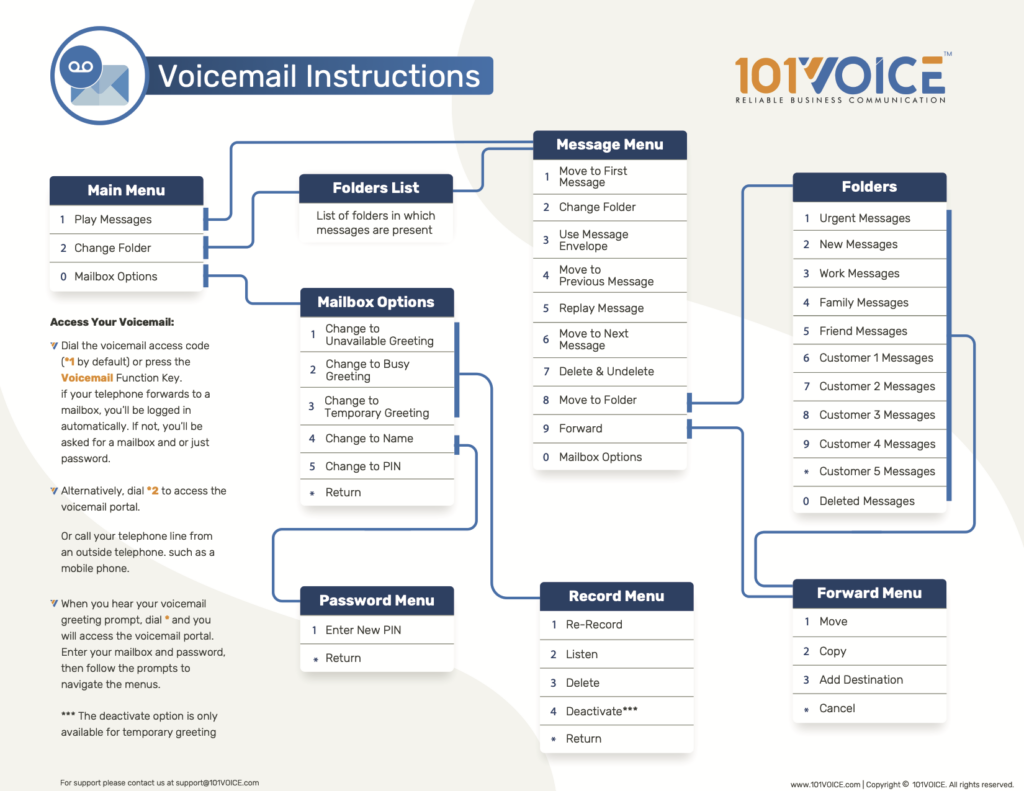
Please refer to the flowchart below for Voicemail Instructions.
Posted 2026-08-05